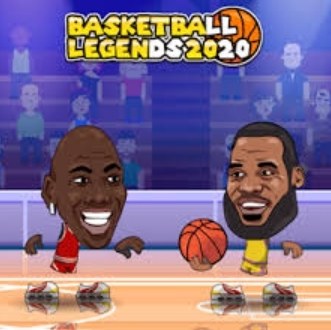
Basketball Legends 2020 is a fast, arcade-style two-on-two basketball game with exaggerated cartoon players and physics. It suits anyone wanting quick, free browser or mobile matches with a tangible progression loop and no paywalls. Fans of NBA Jam will enjoy it, but simulation or management lovers should look elsewhere.
I fired up Basketball Legends 2020 on my phone during a lunch break, half expecting the usual cramped touch controls and muddy menus. The first minute surprised me: the game dumps you straight into a quick two-on-two match with a bouncy orange ball that feels like it has actual weight. The players are these big-headed, exaggerated cartoon athletes that remind me of old Flash hoops games, but the frame rate held steady even on a spotty 4G connection. What hooked me wasn't the graphics or a fancy intro sequence. It was the way the first crossover dribble left a defender sliding past me, and I realized the movement had a slight rhythm to it that I'd need to learn.
You start with a roster of stylized players who differ in subtle ways. Some feel heavier on their feet but can body through a defender. Others are quicker but get pushed around if you try to drive straight into the paint. The opening match acts as a soft tutorial without ever calling itself one. The clock ticks down, the AI plays basic defense, and you figure out the two-button scheme pretty quickly. By the end of that first game, which I lost by six points, I was already planning my rematch. That's a good sign for a browser sports game.
Getting a Feel for the Core Loop
The main mode is a tournament ladder. You pick a team, face a series of opponents with increasing difficulty, and try to unlock new characters and cosmetic balls along the way. The loop is straightforward: win matches, earn in-game currency, spend it on player packs or stat boosts, then take your improved squad back into tougher tournaments. The economy feels tuned for short sessions. You're not grinding for days to afford one upgrade, which makes sense for a game you're playing in a browser tab.
What you're really optimizing for is positioning. The game rewards you for understanding spacing in a way that most mobile basketball titles gloss over. If you crowd your teammate, the AI defense collapses and steals become almost guaranteed. If you spread the floor and use a quick pass to the wing, the lane opens up. I spent my first few games trying to hero-ball my way to the rim with the point guard. That works on the easiest difficulty, but by the third tournament match, the defense adjusts. The game quietly teaches you to move the ball without a tutorial pop-up.
Timing matters on both ends. On offense, releasing the shoot button at the peak of a jumper gives you a green release that almost never misses. On defense, jumping too early on a block attempt leaves you floating in the air while the opponent drives past. The feedback is immediate and fair. When I mistimed a steal, I felt the recovery delay in my fingers. The game doesn't punish you with a long animation. It just makes your player slow for a beat, which is enough to give up an open look.
Mistakes That Will End Your Run Early
I restarted more tournaments than I'd like to admit before I identified the common traps. The first is overusing the sprint button. On mobile, the sprint is mapped to a dedicated on-screen control that's easy to hold down constantly. Doing that drains a hidden stamina bar that you can't see. I only noticed because my player would suddenly stop making sharp cuts late in the second half. The game never explains the stamina system outright. You feel it before you understand it. When your dribbler starts moving through mud, you've already burned your legs in the first three minutes. Let off the sprint except when you're actually attacking an open lane.
The second mistake is ignoring defensive switches. The AI doesn't switch automatically when you get screened, and if you keep controlling the on-ball defender after a pick, you'll leave a shooter wide open in the corner. I developed a habit of tapping the switch player button immediately when I saw a screen coming. It's not perfect, but it prevents the most backbreaking three-pointers the AI loves to hit when you're trailing late.
Third, and this one stung: spending early currency on flashy dunk packages before upgrading core attributes. The dunk animations look great, especially the windmill, but they don't help you when your speed rating is too low to beat anyone off the dribble. I burned my first 2,000 coins on a tomahawk dunk that got blocked seven times in my next tournament because my vertical was still base level. Prioritize speed and ball handling first, then vertical, then worry about making the highlights reel.
Last concrete error: not adjusting to the shot meter's sweet spot. The meter sits above your player's head, and on smaller phone screens, it's easy to lose track of in the middle of a drive-and-kick situation. I started glancing at the release point before the catch, mentally marking where the green zone would be, so I wasn't searching for it mid-shot. That small preparation cut my missed open jumpers by maybe half.
Making the Touch Controls Work on a Phone
The mobile controls in Basketball Legends 2020 are a virtual stick on the left and action buttons on the right, with a few auxiliary buttons for passing and player switching. The layout is standard, but the game does one thing I appreciate: the virtual stick isn't locked to a fixed position. It floats slightly to wherever your thumb lands, which reduces the frustration of missing the stick entirely when you're playing one-handed on a bus or something.
That said, the button placement gets cramped on screens smaller than about 5.5 inches. I tested this on an older phone with a 5-inch display, and my right thumb kept overlapping the shoot and pass buttons during fast breaks. I'd accidentally throw a lob instead of pulling up for a jumper. On a tablet or any phone with a 6-inch screen or larger, this problem mostly goes away. If you're on a smaller device, you can adjust by holding the phone slightly differently, resting it on a surface so both thumbs have room to hover. Not elegant, but it works.
On desktop, the keyboard controls feel looser than I expected. The arrow keys handle movement and the letter keys map to actions, but there's a tiny input delay that doesn't exist on the touch version. I found myself over-dribbling into defenders because I'd press the direction key a split second early and my player would take an extra step. It's playable, and some people might prefer the precision of physical keys for shooting, but I kept coming back to my phone. The game feels built for thumbs.
One mobile-specific setting worth changing immediately: turn off the haptic feedback if your phone supports it. The default vibration on every dribble sounds like a tiny engine rattling in your hand and it drains battery faster than you'd think. I noticed my phone getting warm after fifteen minutes with haptics on. With it off, the game runs cooler and the battery drain is more reasonable for a browser title.
Who Should Actually Play This
If you want a basketball game that respects your time and doesn't demand a login, Basketball Legends 2020 is a solid choice. The matches last about four minutes each, which makes it easy to fit into a coffee break. The progression feels tangible without being predatory. You're not locked out of content behind a paywall because there is no paywall. It's completely free to play in your browser, and the offline functionality means you can load it up on a commute without worrying about signal drops.
People who enjoy arcade-style sports games with exaggerated physics will click with this immediately. The dunks send players flying upward in ways that would make a physics teacher wince, and blocks can send the ball into the third row. It's closer to NBA Jam than a simulation, and that's clearly the intent.
On the flip side, if you want realistic player movement, complex play-calling, or franchise management depth, you'll bounce off this in under ten minutes. The AI runs basic sets and occasionally does something clever like a backdoor cut, but it's not reacting to your tendencies. It's following a pattern. Once you learn the pattern, the challenge comes from execution and tournament fatigue rather than strategic depth. That's not a flaw exactly, but it's a limit.
Also, people with accessibility needs around rapid tapping or precise timing on small touch targets might find the late-tournament difficulty frustrating. There's no difficulty slider and no way to slow the game speed. The higher-level AI starts stealing the ball on cross-court passes with uncanny reflexes, and if you have motor control concerns, that spike can feel unfair rather than challenging.
A Practical Ten-Minute Practice Plan
I put together a short drill routine that helped me stop losing in the first round. It takes about ten minutes and it's meant to be done in the game's quick play mode, not in a tournament where losses matter.
Spend the first two minutes just dribbling with your point guard. Move up and down the court without sprinting, practicing crossover moves and direction changes. Pay attention to how long the animation takes to recover after a crossover. You'll notice a brief window where your player can't change direction again. That's the window the AI exploits on higher difficulties. Learn the rhythm so you're not caught in that dead zone.
Next three minutes: set up pick-and-rolls repeatedly. Call for a screen, wait for the defender to get caught, then decide whether to drive or pass to the rolling big man. Do this until you can read the defender's reaction without thinking. The AI tips its hand early: if the defender goes over the screen, drive. If they go under, pull up. This simple read will carry you through most tournament matches.
Following two minutes: practice your release timing from three different spots on the floor. Top of the key, left wing, right corner. The green zone on the shot meter shifts slightly based on distance, and corner threes have a marginally bigger sweet spot. Get comfortable with the visual cue for each spot. Don't look at your player's feet. Look at the meter.
Final three minutes: play defense without jumping. Force yourself to stay on the ground and use lateral movement only. This will feel wrong at first because the block button is so tempting. But staying grounded keeps you in position to contest shots without giving up rebounds. You'll be shocked how many misses you force just by being there with hands up. Once that discipline becomes automatic, you can add the occasional block attempt back in, but only when you're sure you won't leave your feet early.
I ran this plan before a tournament session and immediately noticed fewer unforced turnovers. My shot percentage crept up, and I stopped giving up offensive rebounds because I wasn't flying past shooters on pump fakes. It's not glamorous practice, but it builds the muscle memory that the game's later stages demand.
Basketball Legends 2020 isn't trying to be the deepest sports game in your browser. It's a quick, satisfying arcade hoops experience that handles well on mobile once you learn its quirks. The stamina system, defensive switching, and shot timing all have real mechanical bite, and the progression rewards smart spending over grinding. For a free game you can play immediately without installing anything, it over-delivers. Just turn off the haptics, practice your release timing, and don't blow your early coins on dunks that look cool but get swatted into the stands.